How to Read Your Electricity Meter and Spot Hidden Power Hogs
Imagine a household whose power bill suddenly doubles with no new appliances. The first instinct is to blame the utility, or to go around unplugging phone chargers. Your meter can settle the question in a few minutes, because it measures everything the house draws, all the time.
Here is the kind of thing it can reveal. At 10 PM with the lights off, the meter's red pulse LED should blink slowly. If it blinks every two seconds on a 1,000 imp/kWh meter, the house is drawing about 1,800 W while everyone sleeps. That points to something big running around the clock, such as a pump stuck on, a forgotten heater, or a dehumidifier that never shuts off. Phone chargers could never account for it.
This guide covers how to read each common type of residential meter, how to turn pulse LED flashes or a spinning disc into watts, how to keep a simple seven-day log, how to find your overnight baseline, and how to tell real power hogs from harmless ones. It also shows how to check a bill against the meter.
Contents in this Guide
- Watts, Kilowatt-Hours, and What You Actually Pay For
- Safety and Meter Etiquette First
- How to Read Each Type of Meter
- Build a Daily Usage Log (The Simplest Audit You Can Do)
- Find Your Standby Baseline with the Meter Itself
- Measure Individual Appliances
- Where the Power Usually Goes
- Reading Your Bill Against Your Meter
- From Measuring to Fixing: What to Check First
- How This Connects to Solar and Backup Planning
- Common Mistakes That Distort Your Audit
- Interactive Tools & Bench Quiz
- Related ElectroLab Calculators & Guides
- Frequently Asked Questions
Watts, Kilowatt-Hours, and What You Actually Pay For
Watts and kilowatt-hours get mixed up constantly. Watts measure power, how fast a device is drawing energy right now. Kilowatt-hours measure energy, the amount used over time. Saying "my air conditioner uses 1,500 watts" tells you nothing about cost until you also know how long it runs.
Picture a tap filling a bucket. Watts are how far the tap is open at this moment. Kilowatt-hours are how much water is in the bucket at the end of the day. The utility bills you for the bucket, not the tap.
Why a 2,000 W Kettle Can Cost Less Than a 100 W Machine Left On
Compare an electric kettle rated at 2,000 W with a desktop PC or small home server that idles at 100 W. The kettle makes the lights flicker and feels expensive. The PC just sits there humming.
Say the kettle runs about 15 minutes a day in total (0.25 h):
Kettle Energy = (2,000 W × 0.25 h) / 1,000 = 0.50 kWh per day
The PC runs all 24 hours:
Router/Server Energy = (100 W × 24 h) / 1,000 = 2.40 kWh per day
The "small" 100 W machine uses nearly five times as much energy per day as the 2,000 W kettle. Big loads that run for minutes rarely wreck a budget. Modest loads that never switch off often do.
Tariff Structures in Plain Terms
What you pay per kilowatt-hour depends on your country, your utility and your plan. Most tariffs are built from some mix of these four pieces:
- Flat rate: every kWh costs the same, whatever the time of day.
- Tiered (block) rates: the first block of each month, say 100 kWh, is cheap, and later blocks cost more.
- Time-of-use (TOU): the price depends on the hour. Late afternoon and evening are usually the most expensive, overnight the cheapest.
- Fixed and demand charges: a daily or monthly connection fee you pay even at zero usage. Some commercial and three-phase accounts also pay for their peak kW.
Here is a tiered example with made-up round numbers: $0.10 per kWh for the first 100 kWh and $0.20 per kWh above that. For a month with 250 kWh used:
Tier 1 cost = 100 kWh × $0.10 = $10.00
Tier 2 cost = (250 kWh − 100 kWh) × $0.20 = 150 kWh × $0.20 = $30.00
Total energy cost = $10.00 + $30.00 = $40.00
Check your own bill to see which structure applies before you work out any savings, because the same kWh saved is worth more on a high tier or a peak-hour rate.
Safety and Meter Etiquette First
The meter, its cover, its security seals and the service cable feeding it belong to your electricity distribution company, not to you.
Never open the meter enclosure, break a seal, or try to bypass, slow or interfere with the meter. Tampering risks electric shock, fire and arc flash, and it is illegal in most places. Do not take the cover off your main breaker panel either. Everything in this guide needs only your eyes, a stopwatch, a phone camera and plug-in monitors on ordinary sockets. If the meter looks damaged, feels hot, sparks or seems wrong, call the utility.
All the methods below are visual or plug-in only, so they are safe for homeowners and tenants. None of them involves touching anything live.
How to Read Each Type of Meter
Meters have gone through several generations, and which one you have depends on your home's age and what your utility has rolled out. Find yours below.
Analog Dial (Pointer) Meters
Pointer-dial meters look confusing because they have four to six small clock faces, each marked 0 to 9. The catch: neighbouring dials turn in opposite directions. The first goes clockwise, the next counter-clockwise, and so on.
Four rules cover almost every case:
- Read left to right: start with the highest dial (often the 10,000 position) and finish with the single-unit dial.
- If a pointer is between two numbers, write down the lower one. Between 4 and 5 means 4. Between 9 and 0 means 9, since 0 counts as 10.
- If a pointer sits right on a digit, check the dial to its right. If that dial has just passed zero, take the digit. If it has not reached zero yet (it is still around 9), the first pointer has not really arrived, so take the digit below.
- Skip test or fractional dials: some older meters have a red or fast-spinning dial marked in tenths. Unless your bill uses tenths, leave it out.
Cyclometer and Digital LCD Meters
Rolling-digit (cyclometer) meters and basic electronic displays are easy. Read the digits left to right, like a car's odometer.
Look for a decimal point. Most utility meters show whole kWh, but some show tenths, often in a smaller font or inside a box or red outline. A display of 12345.6 means 12,345.6 kWh, so use the whole number 12,345 if your bill uses whole units.
Smart Meters and Multi-Register Displays
Smart meters measure many things, so one small screen scrolls through several readings every few seconds, or advances when you press the display button.
To find total energy, look for the register label or OBIS code in the screen corner. Labels vary by manufacturer, so check your meter's manual or your utility's help page if you are unsure:
- 1.8.0 or "Total Import kWh": total active energy delivered to your home from the grid. This is normally the figure your bill is based on.
- 2.8.0 or "Export kWh": on a home with rooftop solar, the energy sent back to the grid.
- Instantaneous kW: many displays include a live power screen, for example
0.48 kW. This is a quick way to see your draw without timing anything.
Prepaid Meters
Prepaid meters, common in parts of the UK, Africa, Asia and Australasia, work on credit you buy in advance. The display usually shows remaining credit (in kWh or currency), not lifetime use. Many keypad models can also show total consumption through a menu or key code, but the code differs by model, so check the manual or ask your vendor.
| Meter Type | How It Shows Usage | What To Read | Common Reading Mistake |
|---|---|---|---|
| Analog Dial (Pointer) | 4 to 6 circular clock dials with mechanical needles | Read digits left to right; apply lower-digit rule | Misreading dial direction (adjacent dials turn opposite ways) |
| Mechanical Cyclometer | Rolling odometer wheels with black and white digits | Read the whole-number digits; leave out the red decimal wheel | Counting the red decimal wheel as a whole kilowatt-hour |
| Basic Electronic LCD | Static digital LCD screen with whole and decimal digits | Active import total indicated with "kWh" | Confusing maximum peak kW demand with total energy kWh |
| Smart Meter (AMR/AMI) | Cycling multi-register LCD screen (auto or button-cycled) | Register 1.8.0 or "POS kWh" (cumulative import) | Recording solar export (2.8.0) or reactive power (kVARh) |
| Prepaid Keypad Meter | Digital display showing credit balance and token entry | Remaining balance, or lifetime total if the menu offers it | Assuming remaining credit represents monthly consumption |
Build a Daily Usage Log (The Simplest Audit You Can Do)
Before buying any gadget, start with a notebook and seven days of readings.
Each morning at the same time, say 8:00, write down the import register. Subtract yesterday's reading from today's to get the last 24 hours in kWh.
One day is never enough. A Tuesday with everyone out looks nothing like a Saturday with laundry, baking and the TV on all evening, and the weather moves cooling and heating use around too. A seven-day average smooths that out and gives you a realistic baseline.
Got Your Seven-Day Usage Average?
Enter your daily kWh into our free Electricity Bill Calculator to model tiered rates and project your monthly bill.
Open Electricity Bill Calculator →Find Your Standby Baseline with the Meter Itself
Every home has a baseline: the power drawn when everyone is asleep and nobody is touching a switch. It covers the modem, TV standby, clocks, cameras, control boards, and the refrigerator's compressor cycling on and off.
You do not need lab equipment to measure it. Your meter is already doing the measuring, and a phone stopwatch lets you read the result.
The Pulse LED Method (imp/kWh)
Most electronic and smart meters have a red pulse LED on the front, with a figure such as imp/kWh or pulses/kWh printed beside it. Common values are 1,000, 1,600 and 3,200. Some meters have a second LED for reactive energy (kvarh), so use the one marked for active energy (kWh).
On a 1,000 imp/kWh meter, each flash is exactly 1 watt-hour. A 3,200 imp/kWh meter flashes faster, with each flash worth 0.3125 Wh.
Two worked examples:
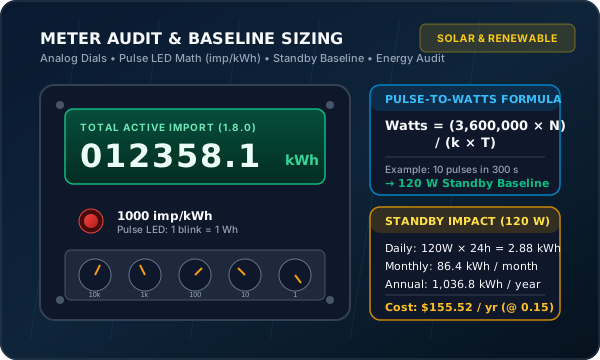
Example A, late-night baseline. The meter says 1000 imp/kWh (k = 1,000). Start the stopwatch on a flash, count 10 more flashes (N = 10), and stop on the tenth, which lands at 300 seconds (T = 300):
Power = (3,600,000 × 10) / (1,000 × 300) = 36,000,000 / 300,000 = 120.0 Watts
The whole house is drawing a baseline of 120 W.
Example B, faster meter. The meter says 3200 imp/kWh (k = 3,200). You count 8 pulses (N = 8) in 45 seconds (T = 45):
Power = (3,600,000 × 8) / (3,200 × 45) = 28,800,000 / 144,000 = 200.0 Watts
The apartment's baseline is 200 W.
The Spinning Disc Method (Analog Meters)
If you still have an electromechanical meter, watch the horizontal aluminium disc through the glass. The nameplate gives the meter constant Kh in watt-hours per revolution. A common value is Kh = 7.2 Wh/rev. If it is printed as revolutions per kWh instead (139 rev/kWh, say), divide: Kh = 1,000 / 139 ≈ 7.19 Wh/rev.
Example C. Kh = 7.2. Using the black mark on the disc edge, you time 5 full revolutions (N = 5) in 36 seconds (T = 36):
Energy = 5 revs × 7.2 Wh/rev = 36.0 Wh
Power = (3,600 × 7.2 × 5) / 36 = 129,600 / 36 = 3,600.0 Watts
That is a heavy 3.6 kW load, typical of a water heater or an oven element running.
What a 120 W Standby Baseline Actually Costs You
Most people shrug at a 120 W baseline: "that is one old light bulb." But it runs all day, every day.
Example D (30-day months, $0.15 per kWh):
Daily energy = 120 W × 24 h = 2,880 Wh = 2.88 kWh
Monthly energy = 2.88 kWh × 30 days = 86.40 kWh
Monthly cost = 86.40 kWh × $0.15 = $12.96
Yearly energy = 86.40 kWh × 12 months = 1,036.80 kWh
Yearly cost = 1,036.80 kWh × $0.15 = $155.52
So a 120 W hum adds up to about 1,000 kWh a year and over $150, before anyone cooks a meal or switches on a TV. Note that part of any baseline is a refrigerator cycling, so time a few readings and take the lowest when you want the true idle floor.
| Measurement Method | Tools Needed | Accuracy | Best Used When | Practical Limits |
|---|---|---|---|---|
| Pulse LED Timing | Stopwatch / Smartphone | ± 3% to 5% | Electronic / smart meters with visible pulse LED | Requires counting over 2 to 5 minutes for small standby loads |
| Analog Disc Revolutions | Stopwatch / Eye on black mark | ± 5% | Legacy electromechanical meters with rotating disc | Very slow disc rotation at low loads makes timing tedious |
| Plug-In Energy Monitor | Plug-in watt meter ($15 - $25) | ± 1% to 2% | Individual 120V / 230V plug-connected appliances | Cannot measure hardwired loads (water heaters, ducted AC) |
| Smart Meter In-Home Display | Utility IHD or Web Portal | ± 1% | AMI smart meters paired to Zigbee / Wi-Fi monitor | Portal data often lags real-time by 15 minutes to 24 hours |
| Electrician Clamp Meter | True-RMS AC Clamp Meter | ± 1.5% | Dedicated panel circuit sub-branch measurements | Requires licensed electrician; never touch open panel interiors |
Measure Individual Appliances
Once you know the whole-house figure, how do you find which machine is responsible?
Plug-In Energy Monitors for Corded Loads
For anything that plugs into a wall socket (fridge, PC, TV, space heater, dehumidifier), a plug-in energy monitor is the easiest tool. Many people know them by the Kill A Watt name.
Plug the monitor into the wall, plug the appliance into the monitor, and leave it. For steady loads like a toaster or kettle, the live watts reading is enough. For anything that cycles, such as a fridge, freezer or portable AC, leave it connected for at least 24 hours and read accumulated kWh. A spot reading during the compressor's off period can show a few watts and miss the 150 W run that comes back every 20 minutes or so.
The Meter-Difference Method for Hard-Wired Loads
Large loads such as storage water heaters, heat pumps, well pumps and induction hobs are wired into the panel, so a plug-in monitor cannot help.
The meter-difference method needs no contact with any wiring:
- Measure the baseline with the pulse LED while the house is quiet. Say it is 120 W.
- Switch on the hard-wired appliance, for example by running the oven or asking for hot water.
- Re-measure straight away. Say the new total is 2,120 W.
- Subtract: 2,120 W − 120 W = 2,000 W.
That is the appliance's real draw, found without opening anything. Keep other loads steady during the test, since a fridge starting mid-measurement skews the result.
Duty Cycle: Why Nameplate Watts Overstate Actual Usage
The rating label on a fridge might say "115 V, 4.5 A" or "350 W". Multiply 350 W by 24 hours and you get 8.4 kWh per day, which is far too high.
The label gives a worst-case or peak figure, not typical use. A healthy fridge compressor runs only about 25% to 35% of the time (its duty cycle) and then shuts off. For cycling loads, trust accumulated kWh over time, not the label.
Checking Meter Sanity with a Known Resistive Load
If you suspect your meter runs fast, a rough check uses a purely resistive load, such as a 2,000 W space heater or kettle. Resistive elements have a power factor of 1.0, so volts times amps equals watts.
With everything else off, a 2 kW heater running for 30 minutes should add about 1.0 kWh, give or take a few percent for voltage variation. Mains voltage varies, so a heater rated 2,000 W at 230 V draws less on a lower supply. A large, repeatable gap is worth reporting to the utility, which can arrange a formal accuracy test.
Where the Power Usually Goes
Rough rule: heating, cooling and water heating usually take the biggest share of a bill. Continuous motors come next, then entertainment and lighting, with small electronics last. The table uses typical figures, so replace them with your own measurements.
| Appliance Category | Typical Watts | Daily Hours | Daily kWh | Monthly kWh (30d) | Monthly Cost (@ $0.15) |
|---|---|---|---|---|---|
| Inverter Air Conditioner (avg run draw) | 1,200 W | 8.0 h | 9.60 kWh | 288.0 kWh | $43.20 |
| Electric Storage Water Heater | 3,000 W | 2.0 h | 6.00 kWh | 180.0 kWh | $27.00 |
| Desktop Gaming PC (left powered on) | 150 W | 24.0 h | 3.60 kWh | 108.0 kWh | $16.20 |
| Refrigerator (average modern cycling) | 150 W | 8.0 h equiv. | 1.20 kWh | 36.0 kWh | $5.40 |
| Electric Water Kettle | 2,000 W | 0.25 h | 0.50 kWh | 15.0 kWh | $2.25 |
| Living Room TV | 100 W | 5.0 h | 0.50 kWh | 15.0 kWh | $2.25 |
| Washing Machine (cold water cycle) | 500 W | 1.0 h | 0.50 kWh | 15.0 kWh | $2.25 |
| Ceiling Fan (medium speed) | 60 W | 8.0 h | 0.48 kWh | 14.4 kWh | $2.16 |
| Wi-Fi Router & ONT Modem | 10 W | 24.0 h | 0.24 kWh | 7.2 kWh | $1.08 |
Note: wattages and hours are typical averages, not measurements of your home. Costs assume $0.15 per kWh and a 30-day month.
The Usual Suspects: The Heavy Hitters
When a bill looks impossibly high, the cause is usually one of three things:
- Heating and cooling: air conditioners working against leaky windows, resistance heat strips, clogged filters or dirty coils.
- Water heating: an uninsulated tank, a thermostat set too high, or a dripping hot tap that makes the 3,000 W element keep reheating.
- Pumps and motors running unnoticed: pool pumps, sump pumps, well pumps and dehumidifiers that run non-stop because of a stuck float switch or humidistat.
The Overrated Suspects: Small Adapters and Phone Chargers
You will often read that a phone charger left in the wall will ruin your bill. It will not.
Chargers sold under current efficiency rules (Energy Star, the EU's ecodesign limits and similar) typically draw well under 0.5 W with no phone attached, and many draw about 0.1 W. Older bricks may use up to around 1 W.
Example E. Be generous and assume six adapters each wasting 5 W all day:
Total draw = 6 × 5 W = 30 W
Daily energy = 30 W × 24 h = 720 Wh = 0.72 kWh
Monthly energy = 0.72 kWh × 30 days = 21.60 kWh
Monthly cost = 21.60 kWh × $0.15 = $3.24
Unplugging chargers is fine, but it saves a few dollars a month. Lowering a water heater thermostat or cleaning air conditioner coils can save far more.
Signs of a Failing Appliance
Appliances often fade rather than fail. A fridge with a bad door seal or clogged condenser coil can see its compressor duty cycle climb from 30% to 75%, which more than doubles its daily kWh while the milk still stays cold. Pumps with worn bearings also draw more. If your log creeps upward with no change in weather or habits, suspect a tiring motor or element.
Reading Your Bill Against Your Meter
Your bill is only as good as the readings behind it, so compare it with the meter itself:
| Bill Item | What It Means | What To Check |
|---|---|---|
| Billing Period Dates | Exact start and end dates when meter readings were recorded | Count total days (a 33-day billing cycle naturally costs more than a 28-day cycle) |
| Opening & Closing Read | Cumulative meter digits at the start and end of the billing period | Confirm the bill's closing read is no higher than what your meter shows today |
| Read Type (Actual vs. Estimated) | Indicates whether a meter reader visited or smart data was collected | Look for "E" or "EST". If the read was estimated, compare it with your actual meter |
| Multiplier / Meter Constant | Current transformer (CT) multiplier on commercial or large services | Ensure multiplier is 1.0 for standard direct-connected residential single-phase meters |
| Fixed Connection Charges | Non-energy standing fee charged per day or month | Verify this is a flat fee independent of how many kWh you conserved |
| Fuel & Regulatory Riders | Pass-through fuel adjustments, taxes, and local grid fees | Check if rate per kWh increased due to utility fuel surcharges rather than higher usage |
If the bill shows an estimated read (EST), nobody read your meter. The figure was projected from past usage or weather. If it looks too high, photograph the meter display with a visible date or timestamp, send the actual reading to your utility and ask for a corrected bill. Most utilities have an online form or an option to submit a self-read.
From Measuring to Fixing: What to Check First
Measurements only help if you act on them. This table links common findings to a sensible first step.
| Audit Finding | Likely Cause | Safe First Step You Can Take | When To Call a Professional |
|---|---|---|---|
| Night Baseline > 250 W | Unnecessary standby devices, pumps, or audio/video racks | Install smart power strips; set PC auto-sleep timers | Continuous draw traced to sub-panel without identifiable plug loads |
| Fridge > 3.0 kWh/day | Dirty condenser coils; cracked magnetic door seal gaskets | Vacuum coils behind fridge; clean/test door gasket seal with a dollar bill | Compressor short-cycling constantly or cabinet failing to stay below 4°C |
| Water Heater > 10 kWh/day | Thermostat set above 60°C; leaking relief valve; bad pipe insulation | Lower tank thermostat to 55°C - 60°C; insulate exposed hot water pipes | Water tank leaking, relief valve discharging, or internal element burned out |
| AC Consuming 50% More Than Last Year | Clogged air filters; dirty outdoor condenser fins; low refrigerant | Wash or replace HVAC air filters; clear leaves from outdoor condenser unit | Refrigerant copper line frosting over or compressor making grinding noises |
| Meter Still Registering with the Main Breaker Off | Possible fault on the utility side of the service, or a meter fault | If the main breaker is off and the meter is still registering, stop there | Contact your utility straight away; do not open or touch the meter or service equipment |
How This Connects to Solar and Backup Planning
If you are planning rooftop solar or a home battery, this audit is the first step. Sizing a system without knowing your daily kWh means either paying for capacity you never use or running the battery flat in the evening.
Cutting a 100 W baseline saves 2.4 kWh a day. At about 4 peak sun hours, that is roughly 600 to 800 W of panels you will not need to buy, plus about 2.4 kWh less battery capacity. The exact numbers depend on your location and system losses.
With your seven-day average in hand, these guides take it from there:
- Solar Panel Sizing Guide: How Many Panels Do You Actually Need? — Convert daily energy demand and peak sun hours into exact panel counts.
- Solar Inverter & Battery Bank Capacity Guide — Calculate inverter surge margins and battery storage capacity for hybrid and off-grid setups.
Common Mistakes That Distort Your Audit
- Reading the wrong register: noting solar export (2.8.0) or reactive energy instead of active import (1.8.0).
- Forgetting that dials alternate direction: this is the classic pointer-meter error.
- Scaling up one day: multiplying a quiet Tuesday by 30 and then wondering why the bill is 40% higher after weekends of laundry and cooking.
- Spot-checking cycling loads: watching a fridge or AC for five minutes and treating that reading as the 24-hour average.
- Trusting nameplate wattage: label values are maximums, not what the appliance actually uses.
- Timing too few flashes: two pulses in five seconds is mostly reaction-time error. Count 8 to 10 pulses on small loads.
- Chasing chargers and ignoring the water heater: hours spent on 0.2 W bricks while a 3,000 W element runs against a high thermostat.
- Assuming the constant: not every meter is 1,000 imp/kWh. Read the figure on yours.
- Blaming the meter first: season, billing-period length (28 vs 33 days) and tariff changes explain most jumps.
- Touching the meter or its seals: it is dangerous and illegal. Leave the enclosure alone.
Interactive Tools & Bench Quiz
Interactive Pulse-to-Watts & Standby Cost Estimator
Enter the pulse constant printed on your meter face, the number of LED flashes counted, and the elapsed seconds from your stopwatch.
Meter Dial Practice Reader Widget
Select pointer positions across five dials to practice applying the lower-digit rule and right-hand dial verification.
Rule Applied: Each dial is recorded at its lower completed number, taking into account alternating rotation directions.
Energy Auditor Bench Quiz
Test your diagnostic skills on real-world meter readings, pulse calculations, and standby baseline identification.
1. Your digital meter has a constant of 1,000 imp/kWh. You count 10 LED pulses in exactly 300 seconds. What is your home current power draw?
2. An analog meter dial pointer rests between the numbers 7 and 8. What number must you record for that position?
3. Which device typically accounts for the highest continuous monthly kilowatt-hour consumption?
4. On a bidirectional smart meter with rooftop solar panels, which register records the electricity delivered to you from the grid?
5. A home maintains an unaddressed 120 Watt baseline running 24 hours a day. At a $0.15/kWh tariff, what does this baseline cost annually?
Related ElectroLab Calculators & Guides
Put your audit numbers into practice with our dedicated electrical tools and repair tutorials:
Run Your Numbers on Our Primary Calculators
Appliances Covered in Other Practical Guides
Frequently Asked Questions
How do I read an electricity meter?
For digital and smart meters, read the main digits on the screen and make sure the register is total active import energy (marked kWh or 1.8.0). For dial meters, read the pointers left to right, remember that neighbouring dials turn opposite ways, and write down the lower number whenever a pointer sits between digits.
How do I calculate kWh from my meter reading?
Subtract the earlier reading from the later one, both taken at the same time of day. The difference is the kWh used in between. Multiply by your tariff for the energy cost.
How do I find what is using the most electricity at home?
Start with the overnight baseline, measured with the pulse LED while big loads are off. Then look at heating, cooling and water heating, which are typically the largest share of a household bill. Put a plug-in monitor on plug-in appliances for 24 to 48 hours to capture compressor cycles, and use the meter-difference method for hard-wired loads.
What does imp/kWh mean on a meter?
It is the meter's pulse constant: LED flashes per kilowatt-hour. A 1,000 imp/kWh meter flashes once per watt-hour. A 3,200 imp/kWh meter flashes 3.2 times per watt-hour.
How many watts is my house using right now?
Time the red LED flashes with a stopwatch and use Power (W) = (3,600,000 × pulses) / (meter constant × seconds). On a 1,000 imp/kWh meter, 10 pulses in 300 seconds works out to 120 W.
Why does my meter run when everything is off?
Most homes have an always-on baseline: Wi-Fi equipment, TV standby circuits, clocks, sensors, alarms, and a refrigerator whose compressor cycles on its own. A stuck pump or a forgotten heater can add a lot more.
How do I read a dial meter with pointers?
Read the dials left to right. If a pointer is between two digits, take the smaller one. If it sits right on a digit, look at the dial to its right: if that dial has passed zero, take the digit, and if it has not, take the digit below.
How many kWh does a refrigerator use per day?
A modern fridge typically uses about 1.0 to 1.8 kWh a day, around 1.2 kWh on average (roughly 36 kWh a month). Old or faulty units with worn seals or clogged coils can reach 3 kWh or more. Check your own with a plug-in monitor.
What to Measure First Tonight
Skip the phone chargers tonight. Wait until dinner is cleared and the laundry is done, around 10:30 PM.
Go to the meter with a phone stopwatch, time ten flashes of the pulse LED and run the numbers through the estimator above. A baseline over 250 W in the dead of night is worth chasing: check for a forgotten dehumidifier or heater, look at the fridge seals and see where the water heater thermostat is set. Then repeat the measurement and see what changed.